RED DEAD ONLINE · PC
A BETTER
PLACE TO RIDE.
Red Dead Online private lobbies for PC.
Built to counter external mods and hacks—not police your playstyle.
Windows 10 / 11 · 64-bit · Red Dead Online required
Support-reviewed access
One simple launcher
Your original settings, preserved
THE FAIRPLAY WAY
LESS FRICTION.
MORE FRONTIER.
Hunt. Trade. Explore.
Or just take the long way home.
FairPlay gives PC players a shared private lobby with one purpose: countering external mods, mod menus, cheats and hacks. Join through Discord, get your Red Dead name approved, and use the Windows launcher. PvP and in-game exploits remain part of the game.
No lobby keys to copy. No complicated setup every time you play. The launcher handles your FairPlay configuration.
Meet the communityLOBBY ACCESS POLICY
NO EXTERNAL CHEATS.
NO PLAYSTYLE POLICING.
Being mean does not mean losing access.
External mods, mod menus, cheats and hacks are prohibited. Glitching and exploiting in-game mechanics are allowed. PvP, griefing, harassment, insults and unfriendly behavior are not grounds for removing FairPlay session-key access.
Evidence comes first. Support must have adequate video or photographic evidence identifying the specific account using external mods or hacks before suspending access. Suspicion, accusations and the number of reports are not proof. Unusual gameplay may be a glitch or another player’s external cheat affecting an innocent account.
We rely on players to gather original clips or screenshots, account names, approximate times and useful context. Submit evidence privately in Discord using Get help → Report a player. Use an appeal ticket if an account was wrongly identified.
This is a lobby-key access policy, not a promise of PvE-only, harassment-free or hacker-free sessions. Discord and Rockstar retain their own platform rules. Key changes affect future access and do not forcibly disconnect current sessions.
Read the rules and report external cheats in Discord ↗BUILT TO GET YOU PLAYING
YOUR NEXT RIDE.
A FEW CLICKS AWAY.
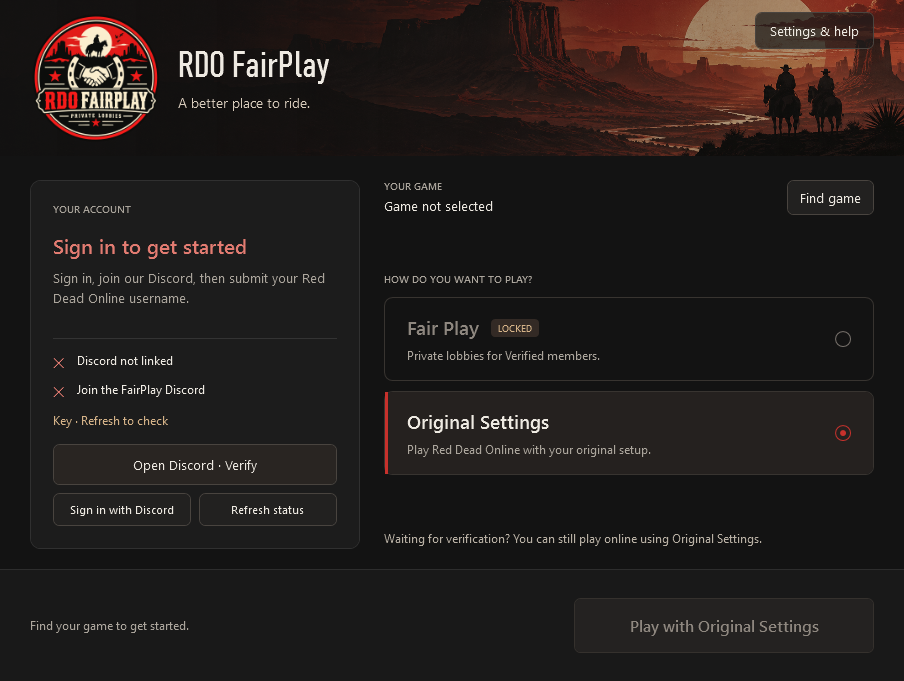
See your account status at a glance. Choose Fair Play when you’re verified, or use Original Settings to play normally.
- Sign in with Discord
- Know when your verification is ready
- Keep a path back to your original setup
FROM DISCORD TO THE SADDLE
THREE STEPS.
THEN YOU’RE OFF.
Your account starts in Discord.
Your next session starts in FairPlay.
- 01
Join the Discord
Head to the verification channel and press Verify My Account. Enter your Red Dead Online username exactly as it appears in game.
Join RDO FairPlay - 02
Get approved
Support reviews your request and grants the Verified role. Need a hand? Use Get help to open a private support ticket.
- 03
Download. Sign in. Ride.
Install the Windows launcher and sign in with Discord. Once verified, choose Fair Play and launch your game.
Get the latest installer
Unsigned Windows download: your browser or Windows may ask for confirmation. Download & security instructions ↗
Waiting on verification?
You can still play online normally using Original Settings in the launcher. Fair Play unlocks after approval.
How can I reduce encounters with modders in Red Dead Online on PC?
RDO FairPlay offers shared private lobbies with Discord verification, player evidence reports, Support review and rotating session keys. It aims to counter external mods and hacks, but cannot guarantee that no cheater enters a lobby.
Are glitches and in-game exploits allowed?
Yes. Glitching and abusing in-game mechanics are allowed. The access restriction concerns external mods, mod menus, cheats and hacks—not exploits performed using the game’s own mechanics.
Will PvP, griefing or harassment get my lobby access removed?
No. PvP, griefing, harassment, insults and being unpleasant are not grounds for removing FairPlay session-key access. FairPlay is not a PvE-only or conduct-moderated lobby service. Discord and Rockstar retain their own platform rules.
What proof is required before someone is suspended?
Support must review adequate video or photographic evidence linking external modding or hacking to the specific account. Suspicion, accusations and report volume alone are insufficient. Submit original evidence privately through a Discord report ticket.
When does the lobby key change?
Scheduled rotation is daily at 5:00 a.m. Eastern time, following daylight saving time. Support can also rotate keys when needed, including after a proven external-cheating suspension. Relaunch through FairPlay for the new key; existing game sessions are not forcibly disconnected.
What do I need to play?
A Windows 10 or 11 PC, a copy of Red Dead Online or Red Dead Redemption 2 with online access, and a Discord account. The installer includes the launcher’s .NET runtime.
How does verification work?
You submit your in-game name in Discord. Support manually reviews it, grants Verified, and applies your approved name as your server nickname where Discord permissions allow. Fair Play stays locked until your access is confirmed.
Can I go back to my usual online setup?
Yes. Choose Original Settings to restore your pre-launcher configuration. If you had a custom configuration before using FairPlay, that original configuration is preserved too.
Does this guarantee a modder-free lobby?
No. FairPlay is an access-managed private lobby service, not an anti-cheat detector. Support removes access only with adequate photographic or video evidence linking external cheats to the account. We rely on player reports and rotate keys; neither can guarantee a hacker-free lobby or disconnect an existing session.
Why might Windows show a security warning?
The current installer is not code-signed, so Windows may show an unknown-publisher or SmartScreen warning. Your browser may also ask you to confirm an uncommon download. Verify the official release before continuing. Read the download and Windows instructions ↗
Keep antivirus enabled. If it detects or quarantines a threat, stop and contact Support with the detection name. Do not disable protection or add exclusions.
How do I update or uninstall?
Close the launcher and run the latest installer to update. Saved settings remain on your PC. Uninstall restores managed game configuration first and keeps recovery files; if restoration fails, it stops so you can resolve the issue safely.
Is FairPlay an official Rockstar service?
No. RDO FairPlay is an independent community project and is not affiliated with or endorsed by Rockstar Games or Take-Two Interactive.